Showing posts with label CPU. Show all posts

Sunday, 15 January 2012

Possible Causes of PC shutdowns and BSOD's

Hey everyone, Today I am going to be looking at a few of the reasons that you can get BSOD's or random shutdowns on your computer. There are lot of things that can cause BSOD's and shutdowns but I am going to mention some of the more common reasons.

Memory or RAM

I am going to start with the RAM or Memory as it is sometimes known. The RAM in your computer acts as a buffer between the CPU and the Hard drive. It is used to store in use programs to help them perform better than if they were loading from the hard drive. Anyway, sometimes the RAM will become unstable and loose little bits of it's memory. If this happens when a program goes to the RAM to look for part of the program that is needed it isn't there. This isn't always too bad as sometimes it will just cause a program you are using to crash, If however the part of the RAM that fails is storing part of the Windows program it can cause BSOD's. You can test your RAM by downloading a program called Memtest86 from here This program can be burned to a disk or put on a pen drive so you can boot from it at start up. It then scans the RAM and tests it for damaged sectors.
RAM Can sometimes cause BSOD's due to damaged sectors

Hard Drive

The next piece of hardware that can cause a BSOD is the hard drive. The hard drive is the part of the computer that stores all of you programs and data. If a hard drive is damaged or starts to wear out it can sometimes damage the programs that are on the drive it self. Just like with the RAM this means that when the hard drive comes to load a piece of data that is needed by windows it can cause it to BSOD due to that part of the program not being there to be loaded. It can also be caused by a head crash which is where the hard drive head hits the disk platter and scratches away the data which renders that whole section unreadable and unusable. Finding out if you hard drive is on the way out is very much like finding out if the RAM is broken. All you need to do is download this program. HD Tune runs on the computer and checks the S.M.A.R.T of the hard drive and also scans the platter for errors.

Hard Drive Errors can cause BSOD's as well
Overheating

The next possible cause of a BSOD is if the hardware of the computer is overheating. There are many reasons that a piece of hard ware can overheat. The following list is some of the causes;
  • Damaged Fans
  • Blocked fans (Usually due to dust build up)
  • Blocked vents (Mostly on laptops caused buy covering the vents with fabric such as trousers)
  • Dried out thermal paste (often on older computers)
  • A heatsink that is not securely attached (damaged in transit or from being knocked or not correctly installed)
When a PC or Laptop starts to overheat it will often shut it self down which can sometimes cause a BSOD. You can check the temperature of the CPU by using a program called CPUID Hardware Monitor downloadable from here once this program is running it will scan all the sensors on the computer and report back the temperatures and voltages. If you can't even boot into windows without the computer BSODing then you will most likely have to go into the BIOS and go into the hardware or PC health section of it to see what temperatures that it is reporting. In the BIOS anything over 45c could be causing an issue, In windows anything over 55c will most likely be a problem once you stress the PC.
Overheating can often cause BSOD problems
Voltages and Power Supply

This one is a less likely cause of a BSOD but it is still a problem. Sometimes the power supply of a PC can go dodgy. This can be caused from stressing it too much (not having a powerful enough one for your hardware) or due to just the age of the power supply (The capacitors often age over time and don't hold charge properly) Also bad quality PSU's (generally less than $10 per 100w) can also cause problems. It is easy to check the voltages by using the same program as the temperature one above. CPUID Hardware Monitor reports back the voltages as well as the temperatures so you can kill two birds with one stone using this program. If the voltages seem a long way off their targets (Shown at the side of CPUID hardware monitor) then this could quite possibly be the cause of the BSOD's.
A bad PSU can cause BSOD's due to bad voltage supply
Now that you have read through this simple list of possible BSOD causes you can have a go at diagnosing the problem for your self. This will save you a lot of money if you find the problem and don't have to use a very expensive PC repair company.

Saturday, 29 October 2011

AMD Does Not Expect Thai Flood to Reduce Demand Towards Its Chips

Advanced Micro Devices does not expect potential shortage of hard disk drives caused by flooding in Thailand to affect its business performance in the fourth quarter. The company projects that existing inventory of hard drives to be enough for Q4 2011 and is more concerned about its own supply problems conditioned by poor yields of 32nm chips at Globalfoundries.

"We do not see an impact in the fourth quarter, to be very honest, at least after discussing with our customers. We will have to see how this is going to impact the supply chain moving forward and into 2012. It depends on a lot of things, how long this situation is going to continue, and then how much damage needs to be repaired. But in short term, not much of an impact," said Thomas Seifert, chief financial officer of Advanced Micro Devices, during a conference call with financial analysts.


Due to flooding in Thailand, largest maker of hard drives Western Digital had to close its HDD manufacturing facilities down, while Seagate Technology suffers tight supply of components, which also reduces its output. In case there is a shortage of drives, PC makers will be unable to sell computers and will thus cut orders for microprocessors. Independent analysts believe that there will be enough hard drives for Q4 2011.

Read More

Related Articles;

Saturday, 22 October 2011

The Bulldozer Review: AMD FX-8150 Tested

 AMD has been trailing Intel in the x86 performance space for years now. Ever since the introduction of the first Core 2 processors in 2006, AMD hasn't been able to recover and return to the heyday of the Athlon 64 and Athlon 64 X2. Instead the company has remained relevant by driving costs down and competing largely in the sub-$200 microprocessor space. AMD's ability to hold on was largely due to its more-cores-for-less strategy. Thanks to aggressive pricing on its triple and hexa-core parts, for users who needed tons of cores, AMD has been delivering a lot of value over the past couple of years.
Recently however Intel has been able to drive its per-core performance up with Sandy Bridge, where it's becoming increasingly difficult to recommend AMD alternatives with higher core counts. The heavily threaded desktop niche is tough to sell to, particularly when you force users to take a significant hit on single threaded performance in order to achieve value there. For a while now AMD has needed a brand new architecture, something that could lead to dominance in heavily threaded workloads while addressing its deficiencies in lightly threaded consumer workloads. After much waiting, we get that new architecture today. Bulldozer is here.
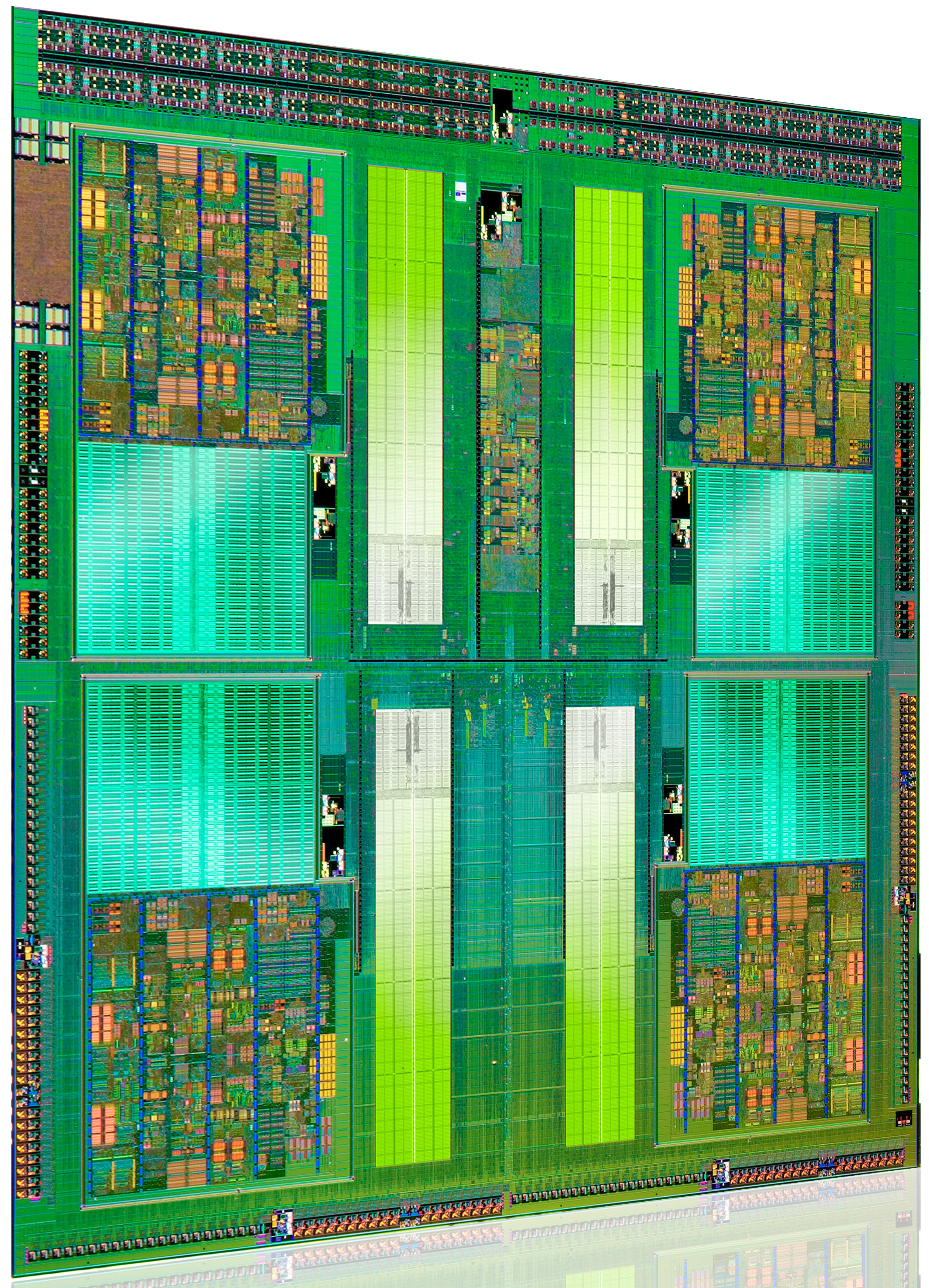
It's branded the AMD FX processor and it's only available in a single die configuration. Measuring 315mm2 and weighing in at around 2 billion transistors (that's nearly GPU-sized fellas), Bulldozer isn't that much smaller than existing 45nm 6-core Phenom II designs despite being built on Global Foundries' 32nm SOI process. Both die area and transistor count are up significantly over Sandy Bridge, which on Intel's 32nm HKMG process is only 995M transistors with a die size of 216mm2. This is one big chip.

Read More - http://www.anandtech.com/show/4955/the-bulldozer-review-amd-fx8150-tested

Related Articles;

AMD Llano A8-3850 vs Intel Core i3 210

Saturday, 30 July 2011

Newegg - How to build a desktop PC

This video has been created by the hardware retail giant, Newegg. They have made this video showing how to build a desktop PC and I was very impressed with how they managed to get everything into it. It is 45 minutes long so be prepared to watch it. However the detail they go into is brilliant.

Wednesday, 20 July 2011

AMD to Update FX Lineup of Microprocessors in Q1 2012

After Advanced Micro Devices releases its FX-series microprocessors code-named Zambezi this September, the company will only refresh its lineup of high-end chips sometimes in the first quarter of next year. The first refresh of desktop Bulldozer family will likely precede the launch of Intel Corp.'s code-named Ivy Bridge microprocessors.

Despite of the fact that AMD's initial family of FX-series Bulldozer microprocessors will only include for models (two eight-core versions, one six-core and one quad-core models), AMD will not broaden it until at least the middle of the first quarter of next year, according to a source with knowledge of AMD's confidential plans. In mid-Q1 2012 AMD is projected to introduce four new models, which will broaden the FX lineup to eight stock-keeping units (SKUs).

The initial family of AMD desktop chips based on Bulldozer micro-architecture due in September will include models FX-8150, FX-8100, FX-6100 and FX-4100. The refresh lineup scheduled to arrive in mid-Q1 2011 will contain FX-8170, FX-8120, FX-6120 and FX-4120 models. Exact specifications of the AMD FX chips currently known only from unofficial sources.

Read More Here
Related Articles;
AMD Llano A8-3850 vs Intel Core i3 2120
AMD A-Series APU Dual Graphics Gaming Performance

Sunday, 17 July 2011

Budget CPU Coolers Reviewed

Hey everyone, In this post I am going to be taking a look at some of the cheaper CPU coolers and heatsinks that are currently on the market. I will be including Specs of each of the Coolers and also if I can find any temperature comparisons online then I will put them in as well.

Xilence XilentBlade Pro

The Xilence XilentBlade pro is one of the cheapest performance heatsinks that is available on the market today. It can cool CPU's upto the Intel Core 2 Quad Q9650 and the AMD Phenom x3 8750. It costs just under £15 ($25) and looks very well built. It has 6 large heatpipes and that fan that is included can move 36cfm of air which means that it will cools most CPU's very well. The design is pretty boring to be honest and just has a huge square block of aluminum fins and a Red and Black fan attached to it so nothing too fancy. Overall I would think that this cooler would be brilliant for cooling Dual Core CPU's that use under 95w of power and for £15 who can complain? Great cooler by Xilence. This cooler can be used on Sockets 775, 1366, AM2, AM2+ and AM3.
This cooler can be found here - http://www.ebuyer.com/product/176093
Xilence XilentBlade Pro
Arctic Cooling Freezer 7 Pro
This CPU cooler design has been around for ages and has earned it self a lot of praise from overclockers over the last couple of years. Arctic has really managed a great budget cooler with this design and you can pick one up for around £15 just like the Xilence XilentBlade. This cooler can be used on Sockets 775, 1156, 1366, AM2, AM3. It has 6 heatpipes and 42 fins for optimal cooling performance and can cool CPU's up to 130w which means pretty much every CPU made currently. It has a 92mm fan on the front of it which is mounted on rubber mounts to stop vibrations. The fan can push 45cfm which is pretty impressive. Overall Arctic cooling has done a very good job at making a Budget CPU cooler and I am very impressed with the quality of this as well as I have used on before.
You can find this CPU here - http://www.ebuyer.com/product/176157
Arctic Cooling Freezer 7 Pro
Zalman CNPS7000C-CU Super Flower
The Zalman CNPS700C-CU is a bit of an out of date design now. I remember having one that was cooling my Athlon XP CPU ages ago. This one looks pretty much exactly the same only it fits different sockets. It will fit the following CPU sockets; AM2, AM2+, AM3, 754, 939, and 940, 775, 1156, 1155 This Cooler features 2890sq/cm of surface area which means that it has a lot of surface to dissipate heat. I couldn't find out how much CFM the fan pushed even on the Zalman website so I can't really make much of a judgement on this cooler to be honest. Overall it is a little outdated now but if you have a computer with maybe a 754 or 939 motherboard then this is still a perfectly good option.
This cooler can be found here - http://www.ebuyer.com/product/153203

Zalman CNPS7000C-CU Cooler

Inno3D iChill XXXX
Inno3D isn't a well known cooler manufacture, They are more specialized at producing cheaper graphics cards. However when I saw this cooler I was amazed that they could produce it so cheap and yet have such good specifications. There are  the specs of this cooler;

Max. Air Flow - 45CFM
Noise - 23-39dB
TDP Limit - 140W
Intel: i7 / i5 / i3 / Socket 1366 / 1156 / 1155/ 775
AMD: Socket AM3 / AM2+ / 939

As you can see from the specifications it has a high flow fan and can cool CPU's up to 140w which is very good. It also has 6 heatpipes to aid heat dissipation from the CPU. Overall this cooler is very good for £17 and it looks like it would do a very decent job of cooling every CPU available today.
This Cooler can be found here - http://www.ebuyer.com/product/244150
Inno3D Ichill XXXX
Overall there are various coolers that would most likely do a good job at cooling your CPU and for under £20, I was amazed at what I found. I would recommend the Inno3D iChill and the Arctic Cooling above the others but those are still capable CPU coolers anyway so there is no need to say they are not good because they are. All great designs and all aimed at the budget market.

Related Articles;
How to keep your PC running cool and quiet - Case fans and Cases
PCI Blower Exhaust Fan Graphics Card Cooler Review

Sunday, 9 January 2011

AMD confirms that triple-cores are here to stay


Advanced Micro Devices' said that triple-core processors would continue to be a part of its offerings. While it is unclear how AMD could make a triple-core chip based on its Bulldozer micro-architecture, the comment may indicate that AMD will have triple-core K10.5-based chips for a long time after the introduction of Bulldozer.

"In most instances dual-core computing was adequate for the majority of users and with an additional core to service the OS, one of the more significant bottlenecks was addressed. Triple-core processors continue to address customer and consumer needs by delivering great performance at great prices. As long as the industry and market find value in these products and request them - AMD will address the need," said Matt Davis, an AMD product marketing manager for desktop solutions.

AMD's Bulldozer architecture and topology employs a number of so-called modules. Every module has two independent integer cores (that share fetch, decode and L2 functionality) with dedicated schedulers, one "Flex FP" floating point unit with two 128-bit FMAC pipes with one FP scheduler. While it is clear that AMD can disable a dual-core module within a many-core chip, it is uncertain whether it can disable one integer core.
Unofficial sources pointed to six-core and quad-core Bulldozer products back in November '10, but there were no indications about triple-core or five-core chips based on Bulldozer design.

Triple-core AMD Athlon II and AMD Phenom II chips powered by K10.5 micro-architecture are available now. Moreover, nothing keeps AMD from selling such chips in mid-term future. The indication that the company will sell them as long as the market wishes to buy them may point to a fairly long transition to Bulldozer from the current-generation architecture.

www.customdesktops.moonfruit.com

Sunday, 2 January 2011