In this post I am going to be briefly looking at some the cheapest socket 1155 motherboards that there is. Socket 1155 is the newest socket offering from the CPU giant Intel. It supports all of Intels latest CPU offerings including the 2nd generation of Intel's Core i7 CPU's. I am going to start by looking at the cheapest 1155 motherboard that eBuyer features on their website.
Biostar H61MGC- http://www.ebuyer.com/product/274290
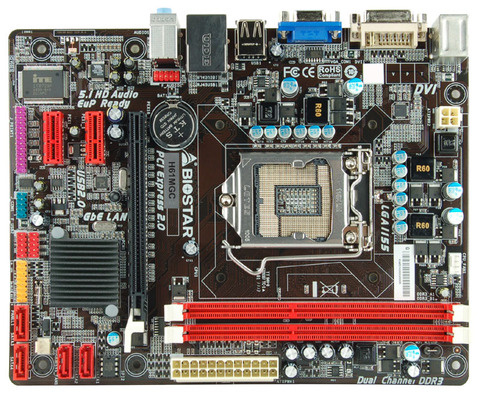
The Biostar H61MGC is the cheapest 1155 motherboard that there currently is on sale. Priced at an amazing £39.60 ($63.82) This is clearly a Budget motherboard and is well worth a good look at when building a 1155 Setup. The motherboard it self has no real stand out features. It only has 2 RAM slots, It doesn't have a Legacy PCI slot or IDE plug. It only has one PCI-E x16 slot. However it does feature onboard graphics which has DVI output and VGA output this means that you could plug it into any monitor including HDMI ones by using a DVI to HDMI adapter.
The H61MGC does come with solid capacitors in the CPU VRM area which means that voltages to your new Core i3, i5 or i7 will be very smooth and well regulated. It supports a maximum power of 95w which is enough to power the i7 2600K, It can also support the cheaper Pentium offerings as well which shows this board can support both high speed expensive hardware as well as lower speed cheaper hardware. It only has SATA 2 however which is a bit of a let down, It most likely won't effect many people however as at the moment the only things that come close to maxing out the bandwidth of SATA 2 ports are SSD drives and not many people use them.
Overall the Biostar H61MGC is a very well priced offering from Biostar and I would recommend it to anyone that simply wants a computer that is good for high speed internet and also some light gaming if fitted with a graphics card.
MSI H61M-E33-B3 - http://www.ebuyer.com/product/260862
The H61M-E33-B3 from MSI is a lot more of a rounded motherboard. It has more of the new features that the new Core series supports. It costs quite a bit more than the Biostar however priced at just over £50 ($80) Having looked at this motherboard the first thing that I noticed was the amount of high quality solid capacitors. This is a good sign as this usually means that the manufacture has not skimped on the quality part of this motherboard to gain extra specifications. The next thing I noticed is that it features a Legacy PCI slot as well as two PCI-E x1 and a PCI-E x16 slot as well. It only has 2 RAM slots like the Biostar but that can be expected at such a good price. It can support upto 16Gb of RAM if you can find the compatible 8Gb RAM sticks.
The H61-E33-B3 also only features SATA II which is a bit disappointing but it is a budget board and remember that not many people max out the bandwidth on SATA II anyway. It supports CPU's upto the i7-2600K just like the Biostar and can handle the slower cheaper Pentiums as well. This board also has a Native HDMI output as well which shows that it was built for HDMI output. I would say that this motherboard would be great paired with an i3 or i5 and put into a media center PC as it also features 8 channel audio output with the 6 needed sockets.
Over all the MSI H61M-E33-B3 looks like a great quality budget board with good features for an amazing price and I wouldn't hesitate to recommended it to anyone looking to build either a budget gaming PC or a Media Center PC.
ASUS P8H61-M - http://www.ebuyer.com/product/261401
The ASUS P8H61-M is the cheapest ASUS board that I could find for socket 1155. It does come with more features than the H61MGC and H61M-E33-B3 and that is to be expected as it costs just over £60 ($96) Having looked at the P8H61-M I noticed that the board is full of ASUS's well known quality, It has only Solid Capacitors, Anti-Surge protection which protects your hardware from Electrical surges, and C.P.R which ASUS claims to help recover the origional BIOS settings should an overclock fail and the board not boot. This sounds like a very useful feature for those people that are always trying to push their components for the best performance they can get.
The P8H61-M supports the same CPU's as the other two budget boards and also only features SATA II again just like the other boards. It has the same card expansion slots as the MSI H61M-E33-B3 and also features only 2 RAM slots. It also lacks the feature of USB 3 which is disappointing as well.
On the positive side this board does have a HDMI output and also a S/PDIF output which the MSI and Biostar are lacking. This shows that ASUS are aiming the P8H61-M at the Media market as S/PDIF is a Digital audio out plug which is the best way to transmit HD audio.
Overall the ASUS P8H61-M seems to be aimed at the media market again but there is no doubt in my mind that a board of this quality couldn't easily handle some gaming work as well so long as it is fitted with either a i5 or i7 processor and a decent graphics card. Who ever said budget gaming was a bad idea?
Gigabyte GA-H61M-D2-B3 - http://www.ebuyer.com/product/261350
My final board is the Gigabyte GA-H61M-D2-B3. This board is the same price as the ASUS and for that I would expect the same sort of features as well. The first thing I notice about this board is the 2 RAM slots. Once again another board that can only have 2 RAM sticks in it. The next thing I notice is the CPU VRM area. It is packed with high quality chokes and capacitors and also features Lower RDS mosfets lowering the power usage and heat output than standard VRM's. The final thing that stands out on this board is the fact that there is no legacy PCI slot, only 3 PCI-E x1 slots which I think may cause some people to shy away from this board as many PCI-E x1 cards a more expensive than PCI cards that offer the same features.
The GA-H61M-D2 also supports the same CPU's as the Biostar, MSI and the ASUS and can support the whole range from the Pentiums to the i7's. What I don't understand with this board is that they haven't included a HDMI output which is very disappointing, They also haven't included the full 6 3.5mm sockets that is usually required when usinging 7.1 audio.
The GA-H61M-D2 also only supports SATA II and USB 2.0 which is also quite disappointing considering they haven't got a HDMI port either.
My overall descision with the GA-H61M-D2 board is that I don't know what audience Gigabyte was aiming this board at. It can't do proper multimedia as it doesn't have a HDMI socket and it also doesn't feature S/PDIF audio output. The quality of the VRM is better than the ASUS's but personally I wouldn't buy it over the ASUS as it seems that it is just lacking features and for the same price it is not worth it.
Thanks for reading. Please Join this site for hardware news and updates. Also check out these related articles;
Welcome to Jack-O-Bytes Reviews. This website reviews hardware and software available for computers. I also write step by step guides for hardware and software related tasks.
Showing posts with label MSI. Show all posts
Thursday, 14 July 2011
Wednesday, 13 July 2011
Budget AMD AM3 Motherboards
Many people these days are looking for computers that are in a certain price range. If you are looking to build a PC in the budget range from around £200-£300 ($300-$500) then these motherboards will work very well for you. They are from good quality manufactures such as ASUS, Gigabyte and MSI and most feature Solid capacitors for better voltage regulation to the CPU.
MSI GF615M-P33
I am starting with the MSI as it was the cheapest AM3 motherboard that I could find from the more reputable and respected motherboard manufactures. It has a 4.5 star rating on the eBuyer website which is where I personally source my computer components from. It features an AMD socket AM3 and supports CPU's that are upto 125w. This means that this little Micro ATX budget motherboard can support many of the AMD 6 core CPU's upto the 1065T. This is very very good support for a motherboard that costs just over £34 ($54) It doesn't support any amazing features such as UEFI BIOS or onboard HD video but it will work for many users that only need a simple office computer. Technically with the PCI-E slot and the support for an AMD Hex Core cpu you may even be able to make a budget gaming computer out of it. I say well done MSI for providing such a great motherboard at such a competitive price.
ASUS M4N68T-M LE
ASUS have really managed a lot with such a small budget with this board. Getting one at such a good price is a bonus really. I found this board at the price of £35 ($56) The ASUS M4N68T-M LE has some pretty basic features if you compare it to high cost motherboards but it has all you need really if you are thinking of just building an office PC or even possibly a low cost gaming machine. It features 4 SATA ports which is enough for most people. It has a PCI-E slot so you can put any modern graphics card into it.
The main problem that I see with this board is the fact that it only has 2 DDR3 RAM slots. I suppose this can be expected on a board like this though. The audio is 8 channel HD but when you run in 8 channel you will loose the other two 3.5mm jacks as they turn into audio outputs for the different channels. The board supports CPU's upto the massive power house of the Phenom II x6 1100T. This means that is can power AMD's best AM3 offering. Overall ASUS have managed to make an amazingly cheap motherboard which can power the best CPU AMD offers on it's AM3 platform and also have basic things such as onboard video and 4 SATA ports. Great board.
Gigabyte GA-M68MT-S2
I am not sure what it is about Gigabyte but they always seem to have very neat looking boards. The look of good build quality and quality components. I think it may be the color scheme that makes it look neat and tidy but then again I am not sure. Anyway, This board is a great board. It costs just under £37 ($59) and it is build by one of the leading motherboard manufactures, Gigabyte. Recently some people have been saying that Gigabyte are better quality boards than ASUS but I personally think they are about level now.
This board has basically the same features as the ASUS board that we looked at above. It has 2 RAM slots which is usually sufficient now that you can easily get hold of 4GB memory modules. It has 4 SATA ports and features onboard VGA graphics. It also has the same 8-Channel HD audio that the ASUS has. This board however can only support up to the Phenom II x6 1090T not the full blown 1100T that the ASUS supports. The build of this board is the main feature really. It has solid capacitors in the CPU VRM's and also has Dual BIOS so that if one fails the other one can take over and repair the failed one.
MSI 760GM-E51
Having looked at a fair few full budget motherboards I decided to move up a few steps and show you a board that feature HDMI onboard. This tidy offering from MSI really looks pretty good. It costs a little over £44 ($70) It features 4 RAM slots and has 5 SATA ports (one of which is mounted as an E-SATA port on the back) The board looks like it has been built using good quality parts, The CPU VRM has fully solid capacitors and it also features solid coils which offer better voltage stability. This board also features the ability to unlock the hidden cores in AMD CPU's and also a flick switch overclock setting which increases the FSB automatically. It has built in 8-Channel audio and also has built in HDMI which makes this board great for using as a cinema system computer. Overall a great board by MSI for such a good price.
Thanks for reading everyone, I hope this has made your decision of budget AMD motherboards easier and better. Jack-O-Bytes
MSI GF615M-P33
I am starting with the MSI as it was the cheapest AM3 motherboard that I could find from the more reputable and respected motherboard manufactures. It has a 4.5 star rating on the eBuyer website which is where I personally source my computer components from. It features an AMD socket AM3 and supports CPU's that are upto 125w. This means that this little Micro ATX budget motherboard can support many of the AMD 6 core CPU's upto the 1065T. This is very very good support for a motherboard that costs just over £34 ($54) It doesn't support any amazing features such as UEFI BIOS or onboard HD video but it will work for many users that only need a simple office computer. Technically with the PCI-E slot and the support for an AMD Hex Core cpu you may even be able to make a budget gaming computer out of it. I say well done MSI for providing such a great motherboard at such a competitive price.
ASUS M4N68T-M LE
ASUS have really managed a lot with such a small budget with this board. Getting one at such a good price is a bonus really. I found this board at the price of £35 ($56) The ASUS M4N68T-M LE has some pretty basic features if you compare it to high cost motherboards but it has all you need really if you are thinking of just building an office PC or even possibly a low cost gaming machine. It features 4 SATA ports which is enough for most people. It has a PCI-E slot so you can put any modern graphics card into it.
The main problem that I see with this board is the fact that it only has 2 DDR3 RAM slots. I suppose this can be expected on a board like this though. The audio is 8 channel HD but when you run in 8 channel you will loose the other two 3.5mm jacks as they turn into audio outputs for the different channels. The board supports CPU's upto the massive power house of the Phenom II x6 1100T. This means that is can power AMD's best AM3 offering. Overall ASUS have managed to make an amazingly cheap motherboard which can power the best CPU AMD offers on it's AM3 platform and also have basic things such as onboard video and 4 SATA ports. Great board.
Gigabyte GA-M68MT-S2
I am not sure what it is about Gigabyte but they always seem to have very neat looking boards. The look of good build quality and quality components. I think it may be the color scheme that makes it look neat and tidy but then again I am not sure. Anyway, This board is a great board. It costs just under £37 ($59) and it is build by one of the leading motherboard manufactures, Gigabyte. Recently some people have been saying that Gigabyte are better quality boards than ASUS but I personally think they are about level now.
This board has basically the same features as the ASUS board that we looked at above. It has 2 RAM slots which is usually sufficient now that you can easily get hold of 4GB memory modules. It has 4 SATA ports and features onboard VGA graphics. It also has the same 8-Channel HD audio that the ASUS has. This board however can only support up to the Phenom II x6 1090T not the full blown 1100T that the ASUS supports. The build of this board is the main feature really. It has solid capacitors in the CPU VRM's and also has Dual BIOS so that if one fails the other one can take over and repair the failed one.
MSI 760GM-E51
Having looked at a fair few full budget motherboards I decided to move up a few steps and show you a board that feature HDMI onboard. This tidy offering from MSI really looks pretty good. It costs a little over £44 ($70) It features 4 RAM slots and has 5 SATA ports (one of which is mounted as an E-SATA port on the back) The board looks like it has been built using good quality parts, The CPU VRM has fully solid capacitors and it also features solid coils which offer better voltage stability. This board also features the ability to unlock the hidden cores in AMD CPU's and also a flick switch overclock setting which increases the FSB automatically. It has built in 8-Channel audio and also has built in HDMI which makes this board great for using as a cinema system computer. Overall a great board by MSI for such a good price.
Thanks for reading everyone, I hope this has made your decision of budget AMD motherboards easier and better. Jack-O-Bytes
Labels:
760GM-E51,
8-Channel Audio,
AM3,
AMD,
ASUS,
Athlon II,
Budget,
Cheap,
GA-M68MT-S2,
GF615M-P33,
Gigabyte,
HDMI,
M4N68T-M LE,
Motherboard,
MSI,
Onboard,
Phenom II,
Sata,
Sempron,
Solid Capacitors
Saturday, 14 May 2011
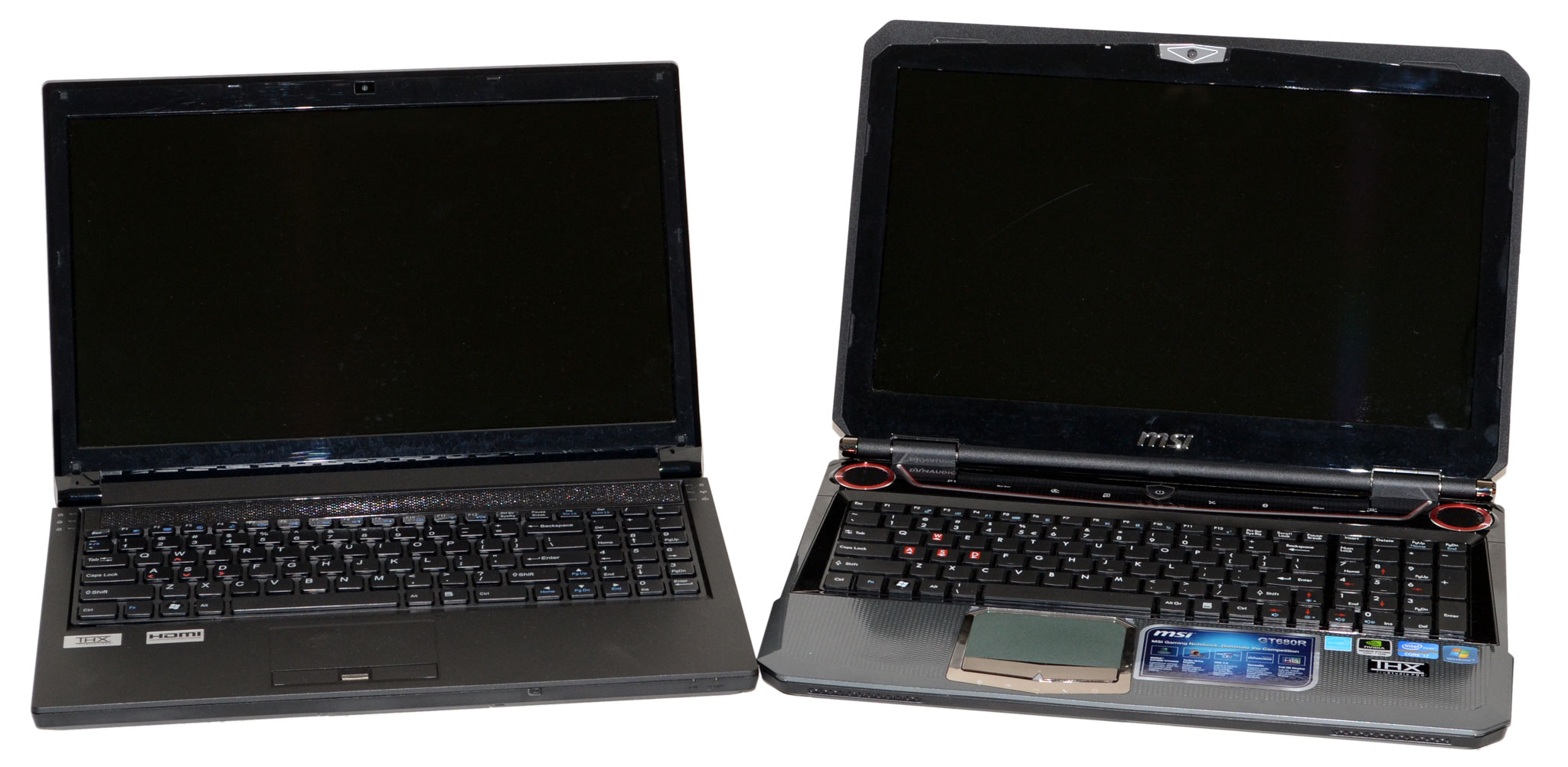
CyberPower's X6-9300 and MSI's GT680R: Fighting for Your Mobile Gaming Dollar
The Fight for Your Mobile Gaming Dollar
At a macro level, there really aren’t all that many viable gaming notebook options. These days, Sandy Bridge processors rule the roost in notebooks, with the quad-core variety handling everything from single-threaded to multi-threaded workloads with aplomb. On the graphics side, you can try to get by with midrange mobile GPUs, but if you’re serious about mobile gaming you’ll want at least something from NVIDIA’s GTX line or AMD’s 6900M alternatives. Take the CPU and GPU; match them up with reasonable memory, storage, display, and other accoutrements; and you’re all set. That all works very well in the desktop world, even if it glosses over many of the finer points that separate the contenders from the pretenders. In the mobile world, however, the little things matter.
Modern computers are very modular by design. We have standards for power, memory, storage, and peripherals and you can generally choose what fits your needs. With notebooks, however, a lot of flexibility gets sacrificed in the name of making a reasonably sized chassis. Not coincidentally, profit margins tend to be quite a bit higher for notebooks than desktops, which is why so many companies want a piece of the pie. While it’s still pretty easy to upgrade memory and storage options, swapping out the CPU for something faster is more difficult and you need to make sure the cooling setup can handle any additional heat. Upgrading your GPU on the other hand is difficult at best, and frequently impossible. The issue with mobile GPUs is that despite MXM being something of a standard, chip locations are left up to the implementation, so there’s no guarantee that, for example, an HD 6770M could be installed in place of a GT 540M. And as far as the LCD, keyboard, touchpad, motherboard, and chassis are concerned, you’re stuck with whatever you buy with no chance of upgrading individual parts in the future. (Okay, perhaps you could upgrade the LCD panel in some cases, but you get what we’re saying.)
At a macro level, there really aren’t all that many viable gaming notebook options. These days, Sandy Bridge processors rule the roost in notebooks, with the quad-core variety handling everything from single-threaded to multi-threaded workloads with aplomb. On the graphics side, you can try to get by with midrange mobile GPUs, but if you’re serious about mobile gaming you’ll want at least something from NVIDIA’s GTX line or AMD’s 6900M alternatives. Take the CPU and GPU; match them up with reasonable memory, storage, display, and other accoutrements; and you’re all set. That all works very well in the desktop world, even if it glosses over many of the finer points that separate the contenders from the pretenders. In the mobile world, however, the little things matter.
Modern computers are very modular by design. We have standards for power, memory, storage, and peripherals and you can generally choose what fits your needs. With notebooks, however, a lot of flexibility gets sacrificed in the name of making a reasonably sized chassis. Not coincidentally, profit margins tend to be quite a bit higher for notebooks than desktops, which is why so many companies want a piece of the pie. While it’s still pretty easy to upgrade memory and storage options, swapping out the CPU for something faster is more difficult and you need to make sure the cooling setup can handle any additional heat. Upgrading your GPU on the other hand is difficult at best, and frequently impossible. The issue with mobile GPUs is that despite MXM being something of a standard, chip locations are left up to the implementation, so there’s no guarantee that, for example, an HD 6770M could be installed in place of a GT 540M. And as far as the LCD, keyboard, touchpad, motherboard, and chassis are concerned, you’re stuck with whatever you buy with no chance of upgrading individual parts in the future. (Okay, perhaps you could upgrade the LCD panel in some cases, but you get what we’re saying.)
Tuesday, 1 February 2011
A review of MSIs Sandy Bridge laptop, the GT680
When MSI unveiled the new GT680R gaming laptop at CES this year, the company touted it as one of the "fastest, most powerful gaming notebooks in the world." As one of the first laptops to take advantage of Intel's Sandy Bridge processor, this laptop definitely packs plenty of power. Under the hood, you'll find NVIDIA GeForce GTX 460M graphics with 1.5GB of video memory, 8GB of DDR3 system memory, and two 500GB 7,200rpm hard drives.
The GT680R isn't MSI's only new notebook to offer a Sandy Bridge processor. Like MSI's other products based on the second generation Core processors, the GT680R offers USB 3.0 connectivity as well as the MSI Turbo Drive Engine for easy, one-touch overclocking. This 15.6-inch laptop supports full HD (1980x1080) with its LED-backlit display. There's also a HDMI port for outputting content from the notebook onto larger displays. The GT680R also comes with Dynaudio speakers and THX TruStudio Pro for a more true-to-life sound quality experience.
Read the full review here.
www.customdesktops.moonfruit.com
Sunday, 16 January 2011
MSI and Gigabyte introduce new custom GTX 500 series based graphics cards
MSI Twin Frozr II GTX 570 & 580:
MSI today officially unveils its N500 series of graphics card featuring the award-winning Twin Frozr II Thermal Design. The Twin Frozr II Thermal Design has garnered unanimous praise from professional media and end-users for providing the best balance between cooling performance and lowest sound levels. With the Twin Frozr II cooler, noise output is reduced by up to 8.4dB (when compared to the reference design). More importantly, operating temperatures are reduced by up to 20°C versus other cooling solutions. Thanks to MSI Afterburner, unsurpassed clock speeds can be achieved with the combined features of the excellent Twin Frozr II Thermal Design and MSI's N580GTX and N570GTX GPU.
Gigabyte GTX 570 WindForce3X Edition:
Gigabyte released a new overclocked non-reference design GeForce GTX 570 graphics that makes use of its WindForce3X custom cooler. The GV-N570OC-13I from Gigabyte uses clock speeds of 780 MHz core and 1560 MHz CUDA cores, against reference speeds of 732 and 1464 MHz, respectively. The WindForce3X cooler keeps the beast cool. It makes use of a dense aluminum fin array to which heat is conveyed by a number of copper heat pipes, and ventilated by three 80 mm fans. The blue Ultra Durable VGA PCB by gigabyte makes use of top-quality components and 2 oz copper layer board. Other specifications are standard: 480 CUDA cores, and 1280 MB of memory across a 320-bit GDDR5 memory interface. Gigabyte did not give out pricing information.
MSI:
Gigabyte:
Subscribe to:
Posts (Atom)